
Introduction
A short while ago, it was considered normal practice to drop a cookie on a visitor's device. Once a person opened a page on a website, it started tracking them without asking for permission. This may seem normal, but the times are changing.
With stricter privacy laws such as the GDPR in Europe, which requires explicit consent before non-essential cookies can be placed on a user's device, and India's new DPDP Act, which puts the onus of obtaining user consent on the data processor, browsers are moving towards limiting third-party cookies, and Google is requiring advertisers to utilize consent management platforms that make it easier for users from the EEA and UK to give or refuse consent.
Marketers and webmasters can get confused between Google's CMP (Consent Management Platform) and Google Consent Mode, believing the two to be one and the same or that they only need to implement one solution. However, the two services are very different and having a CMP without Consent Mode can lead to such issues as a loss of data, improper ad tracking, and invalidation of legal compliance.
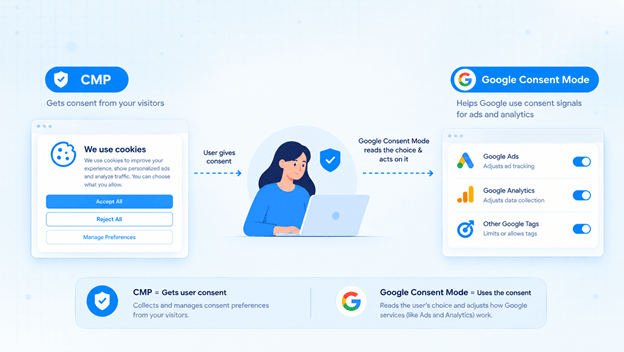
At the most basic level, CMP is the tool that obtains consent from the visitor, whilst Google Consent Mode is the implementation Google provides to read the user's choice and act upon it.
What Is Google Consent Mode?
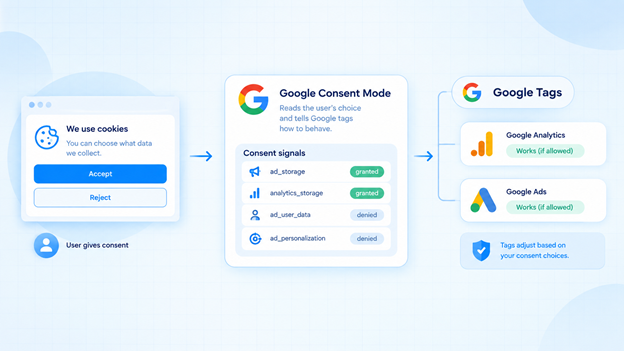
Google Consent Mode is a function allowing your website to notify Google tags of the visitor’s consent to specific activities. Based on this information, each tag (Google Analytics and Google Ads, for example) is adjusted to the user’s preferences. In other words, if the visitor rejects cookies, Google tags will operate in a restricted manner. If they accept cookies, all functions will be available.
The crucial point is that Consent Mode does not collect any consent; it simply relays the information provided by the website to Google. This is the main difference between Google Consent Mode and CMP.
Learn More: How CMPs Work With Google Consent Mode
Consent Signals Explained
Google Consent Mode uses several simple signals to indicate the user’s choices. Each signal must be either “granted” or “denied.” There are four types of signals:
ad_storage- allows storing advertising cookies on a user’s device.analytics_storage- allows storing cookies for website analytic tools (GA4, etc.).ad_user_data- allows Google to collect user data for advertising purposes.ad_personalization- allows using personalization and remarketing functions.
When the user grants or denies consent by clicking “accept” or “reject” on your banner, these signals are updated. Then Google tags read these signals and adjust their operations. Note that without the correct signals, tags will not know what to do.
Basic vs Advanced Consent Mode
Google Consent Mode can be used in two modes:
| Feature | Basic Consent Mode | Advanced Consent Mode |
|---|---|---|
| Tags before consent | Blocked completely | Load, but with limited data |
| Data sent when consent is denied | None | Cookieless pings |
| Conversion modeling | Limited | Stronger, uses more signals |
| Privacy approach | Very strict | Strict, but keeps more insight |
| Best for | Sites that want maximum caution | Sites that want better modeled data |
The basic mode is recommended for most users because it helps avoid any data collection before consent. The advanced mode is suitable for companies that want to provide Google tags with more data to fill in the information not covered by the basic mode. Thus, the choice of the mode depends on the legal consultation of your company and the specifics of your business.
Consent Mode V1 vs V2
Consent Mode V1 had only two signals: ad_storage and analytics_storage. In late 2023 Google released a new version V2 and added two more signals: ad_user_data and ad_personalization. This happened due to the EU’s Digital Markets Act.
| Point | Consent Mode V1 | Consent Mode V2 |
|---|---|---|
| Signals | 2 | 4 |
| Ad personalization control | Partial | Full |
| EEA/UK ad features | Worked | Needed for full use |
| Status today | Outdated | The current standard |
If you are still using V1, you should upgrade to V2. We will explain why in section 7.
What Is a CMP (Consent Management Platform)?
A Consent Management Platform, or CMP, is the technology used to communicate with a website’s visitors. It is responsible for displaying the cookie banner, explaining the uses of cookies, collecting the user’s consent and storing their choice accordingly.
Therefore, based on the Google Consent Mode vs CMP difference, the CMP is the “door” of the website, where consent is granted, denied or withdrawn. At the same time, the Consent Mode acts like a “courier,” relaying the requested information to Google.
Core Features of a CMP
A CMP usually comes with standard features like
- Customizable cookie banners,
- Automatic scan and categorization of cookies,
- Granular consent options (analytics, marketing, functional),
- Evidence of consent,
- Built-in compliance with GDPR, CCPA, the DPDP Act and other regulations
- Multilingual banners,
- GTM and Google Consent Mode compatibility
- The possibility to withdraw or update consent at any time.
What Is a Google-Certified CMP?
The GMP or Google Partners, in the case of CMPs, refers to the company that Google recommends working with. A CMP that has passed Google’s evaluation and technical testing and is able to relay the user’s consent to its advertisers is Google-certified. The CMPs in this group are able to pass consent signals to Google Tags and often comply with the IAB TCF framework.
Note that whenever you plan to use any advertising services in the EEA or the UK, you are obliged to inform Google of your CMP solution and its level of compliance. Therefore, while considering the Google Consent Mode vs CMP differences, always check if the CMP is certified or not.
Google Consent Mode vs CMP: Key Differences
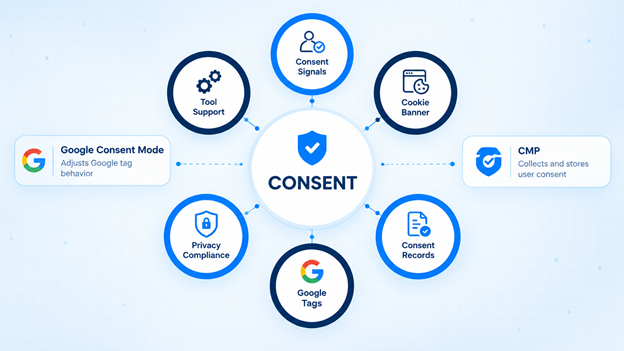
Now, let's put both side by side. The easiest way to differentiate between Google Consent Mode and CMP is that one collects the permission, and the other one takes action.
| Point | Google Consent Mode | CMP |
|---|---|---|
| Main job | Adjusts Google tag behavior | Collects and stores user consent |
| Shows a banner? | No | Yes |
| Stores proof of consent? | No | Yes |
| Works with non-Google tools? | No, Google only | Yes, many tools |
| Helps with legal compliance? | Partly | Yes, directly |
| Need setup in GTM? | Yes | Yes |
| Can I work alone? | No | Yes, but with gaps in Google tools |
Can Consent Mode Replace a CMP?
No. This is one of the most common mistakes of the Google Consent Mode vs CMP discussion. There is no banner in the Google Consent Mode, no consent records or any way to ask the visitor anything. It is only a set of signals.
A CMP can run without a Consent Mode but then your Google tags will not be reacting to the user choice in the best possible way. There is a danger of losing data or violating the privacy regulations. The correct answer to Google Consent Mode vs CMP debate should not be one or another but both, working together.
How Google Consent Mode and CMP Work Together
When you understand Google Consent Mode vs CMP roles, everything falls into place. CMP collects the choice, and Consent Mode applies the choice to Google tags.
Consent Flow: Banner to Google Tags
Let me give an example of how things work. One user opens your site → your CMP script runs first and sets default consent (typically, all denied for users from certain jurisdictions) and displays the cookie banner. The user interacts with the banner and accepts, rejects or customizes their consent choice; this information gets stored in the CMP cookie. After that, your Google tags are executed and evaluate CMP information and only then behave according to the visitor's choices.
A cookie banner typically only takes a few seconds to appear. This is why it is essential to follow the proper implementation order if you have loaded Google's analytic tags before the CMP sets the default consent choice; these tags might start working right away and violate the user's expectations.
Setup with Google Tag Manager
Most websites use Google Tag Manager (GTM) to connect CMPs and tags. First, you should add your CMP’s template or script to the header or body of every page so that it will load before other elements utilizing the first-party cookie. Then you need to open your GTM interface, enable Consent Overview, and choose the default consent state. Next, you need to make sure that your CMP sends an “update” command after the user gives their consent. Finally, you should ensure that every Google tag has the right consent levels.
Modern CMPs such as ConsentX provide a Google Tag Manager template, which allows you to avoid programming errors when implementing CMP into GTM. In case of GTM + CMP implementation, GTM acts as a mediator between tags and the CMP itself.
Consent Mode Without a CMP: What Goes Wrong?
Some organizations attempt to use the Google Consent Mode without a CMP. However, this approach has several significant disadvantages. For instance, since there is no banner, users cannot give their consents. Additionally, consent signals are either hard-coded or guessed by Google, which is not transparent enough. Moreover, no legal proof of given consent is available for users who request it and for the regulators. Most importantly, tags from the third-party sources do not respect these signals.
That is why Google Consent Mode vs CMP has a rather evident winner. Using Google Consent Mode without CMP is like locking the door without a key.
Compliance: GDPR, DPDP Act and Google EU User Consent Policy
Laws are the most important factor explaining the significance of this topic. According to GDPR, explicit and informed consents to the use of non-essential cookies are mandatory. According to India’s Digital Personal Data Protection (DPDP) Act, consent is also considered one of the critical principles for processing any personal data. That is why organizations collecting information about website users must ensure that they have received user consent during the browsing session, and the notice is clear. Google’s EU User Consent Policy also addresses the issue of obtaining user consent. Thus, providing services to users in EEA or the UK requires websites to obtain and share valid user consent with Google.
By not following these policies, businesses are at risk of having their advertising features disrupted or limited. Notably, none of the policies above require the use of the so-called Consent Mode. Instead, they require you to design an appropriate mechanism for receiving consent, for example, by using a CMP solution. However, you should keep in mind that in Google’s context, CMP implementation and Consent Mode are two different things, so you should consider both options.
Why Proof of Consent and Consent Logging Matter
Imagine that your user says something like "I've never agreed to be tracked". Can you prove the opposite? Only a CMP with logging of consents can do that. A proper log will include the date and time of consent, the choices made, the version of the banner shown and a user ID.
Consent Mode does not store any of that information, which is another reason why CMP versus Consent Mode choice is not that simple. Logs are there to protect you in case of any audit or a user complaint.
Business Impact of Google Consent Mode
Google Consent mode is also beneficial for the business due to its ability to improve marketing performance.
Effect on GA4 and Conversion Tracking
With the default GA4 setup, the user activity of people who declined cookies is not registered and impacts the number of users and conversions in GA4 reports negatively. With the help of consent mode, GA4 tracking can receive additional inputs from users who have denied consent. It allows the system to provide more accurate information about the website’s traffic and performance.
Behavioral and Conversion Modeling
GA4 processes the information about users who have not consented to cookie tracking by estimating their activity based on the behavior of users in the similar segments. This way, the data from users who have not accepted cookies can improve the accuracy of conversion and behavioral modeling in GA4. However, there is a possibility that such estimates might be lower than the actual data. This issue is resolved when more users give consent to cookies, and the sample size needed for a competitive niche is bigger, thus requiring more time for processing. Overall, the impact of the data collected with the help of Google Consent mode is positive, and the benefits of using this technology can be seen as sufficient to justify the “use both” answer to the initial question.
Risks of Not Implementing Consent Mode V2
The businesses that do not use Google Consent mode V2 run the risk of being unable to create remarketing audiences within the EEA and the UK. This limitation affects the volume of conversions in Google Ads and the accuracy of the tracking within the regions. The overall performance of the advertising campaign is impacted as well in cases when Google does not receive enough data about the audience’s behavior. Moreover, the proper collection of user consent is necessary to avoid legal issues with the regulations. Therefore, the usage of Google Consent mode V2 is almost mandatory for businesses that use Google Ads within the European Union.
How to Choose the Right CMP
By now, the Google Consent Mode vs CMP difference should become clear – Consent Mode passes the signals and a CMP collects the consent. So, the next question is, which CMP should you choose? It is a lot more important than many teams realize. The wrong CMP can drag down performance, interfere in Google tags or even fail to collect the proof of consent when it is needed most.
The best CMP is not defined by the cheapest price or the fanciest banners. It is about ticking all the boxes required to fulfill the legal requirements, Google tag compatibility and ease of implementation for your team. You have to think about your audience – where they are based, what laws apply to them and how many tags you need to monitor for consent. Your privacy compliance requirements for a small blog based in India will be much different than an eCommerce store selling across Europe.
You also have to think about the future. Google frequently changes its privacy regulations and the applicable laws also change. The right CMP provider should be able to update their software so you do not have to tweak every single rule manually. There is no use in choosing an inexpensive CMP that requires constant maintenance. Before buying any CMP subscribe to a free trial, look at the banners on mobile and desktop and run a few tests.
CMP Selection Checklist
Use this checklist while comparing CMPs:
- Google-certified: certified by Google, especially if you run ads in the EEA or UK
- Consent Mode V2 support: all four consent Signals are transmitted
- Ready GTM template: fewer mistakes during the implementation
- Consent logging: logging of the date, time, selections made, and the banner version
- Multi-law support: support for GDPR, CCPA, and the DPDP Act
- Auto cookie scanning: cookies are scanned and categorized
- Fast banner: does not slow down the website
- Easy to customize: no need for a developer to edit the banner
- Easy withdrawal: it is possible to withdraw consent at any time
- Transparent pricing and support: no hidden fees and 24/7 support
Conclusion
The Google Consent Mode vs CMP question is answered by saying that these are not two separate solutions but rather a system of two interlocking parts. A CMP (Consent Management Platform) is used to seek and store the user’s approval, while Google Consent Mode is a tool that recognizes this choice and notifies the Google tags about the status of consent.
Using a CMP as a stand-alone solution will prevent Google tags from adapting to the user’s choice. On the other hand, using Google Consent Mode as a stand-alone solution will deprive the website of banners and consent records. Both CMP and Google Consent Mode are needed to ensure legal compliance and collect the necessary data from Google Analytics 4 and Google Ads.
Make consent simple. Start your free trial with ConsentX today.