
Introduction
Cookie laws are getting stricter every year. GDPR, CCPA, and DPDPA, in particular, require websites to gain explicit consent from their visitors before tracking them. While most website owners already know that they need a cookie banner, fewer are aware about the details of what happens after users click Accept or Reject cookies.
Google Consent Mode is a good solution to address this problem and help your website comply with all regulations while still allowing you to collect all the data you need for analytics and advertising. However, it is not a standalone tool. To be able to use Google Consent Mode, one has to have a CMP (Consent Management Platform) installed on their website. CMPs are responsible for asking your users for consent and then transmitting the information to Google tags. This article will explain how exactly Google Consent Mode works with CMPs and provide some information about working with cookies on your website.
Google Consent Mode is a tool developed by Google to help website owners balance regulation compliance and data collection. With this tool, tags that use Google services can be paused or modified depending on whether a user has consented to tracking and what specific tracking features they have allowed on the website.
To put it more simply, this tool makes it possible for Google services to operate in a manner consistent with cookie laws. However, the tool itself does not have any functionality to request user consent –for that, Google-recommended CMPs have to be used in conjunction with the tool.
These CMPs can be used to collect consent from users and then notify Google tags of their choice, thus allowing the website to continue functioning normally without violating the laws. Understanding how CMPs and Google Consent Mode interact is essential to being able to set up a cookie compliance system on one’s own website. The following sections will also discuss the modes of operation, features, and ways of checking that everything is set up correctly.
What Is Google Consent Mode?
Google Consent Mode is Google’s framework that enables your website to inform Google tags (Google Analytics and Google Ads) whether a specific user consented to cookies and tracking. This information overrides the default settings of Google tags and impacts the tracking process.
By implementing Google Consent Mode, you can enjoy all the benefits of Google tags’ analytical and marketing potential while respecting user privacy and being compliant with privacy regulations.
When a website visitor consents to cookies, everything works as usual, and you can collect analytics data using Google tags. However, if a user does not consent to cookies, Google tags can still collect some information about the website visitor with a cookie-less ping.
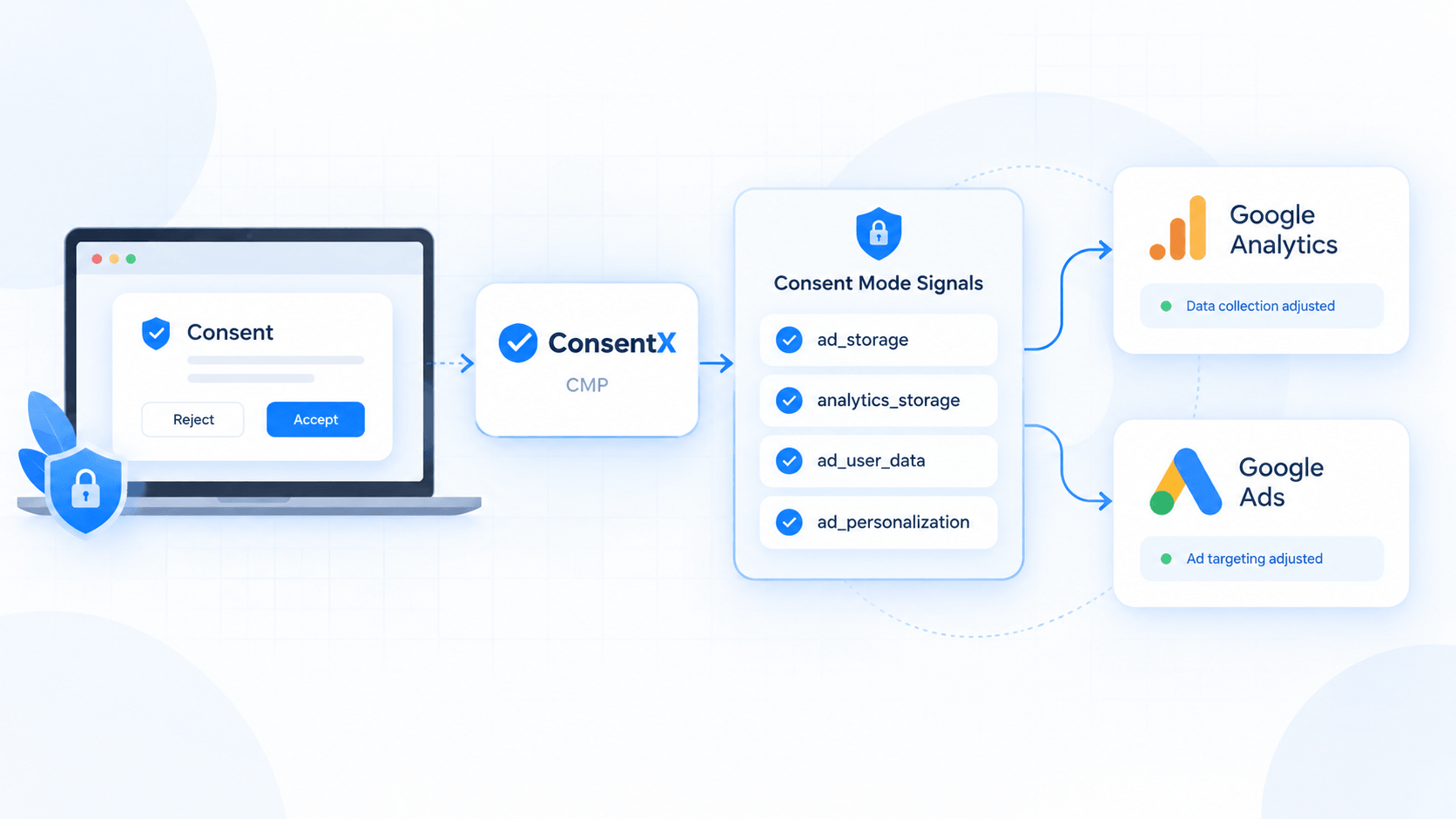
Google Consent Mode utilizes several cookies to operate. Each cookie stores a specific consent string for your domain. Below is the list of all available signals in Google Consent Mode v2.
| Consent Signals | What it controls |
|---|---|
| ad_storage | Storage of cookies related to advertising. |
| analytics_storage | Storage of cookies related to analytics, like Google analytics. |
| ad_user_data | Whether user data can be sent to Google for advertising. |
| ad_personalization | Whether data can be used for personalized ads. |
Every time a visitor makes a choice on your cookie banner, your CMP updates these signals. This is the core link between consent collection and how Google's tags actually behave.
How Do CMPs Work With Google Consent Mode?
CMPs work with Google Consent Mode by representing the user's choice to the website's Google tags. The CMP collects the choice and passes it to Google tags through the signals in Google's Consent Mode. Let's look at the process of consent personalization in Google Tag Manager through a scenario where a user visits the website:
- When the user visits the website, the CMP (Consent Management Platform) is loaded before any non-consensual trackers.
- The CMP shows a consent banner to the user and asks them to allow or deny cookies or ask for customized settings.
- The user is given the choice to customize their consent, and the CMP updates the Google Consent Mode signals: ad_storage, analytics_storage, ad_user_data, and ad_personalization.
- Google tags read the signals and change the behavior of collecting enhanced data, limited data, or no data based on the user's choice.
- If the user updates their choice, the CMP will update Google's signals in real-time.
That's why the expression "CMPs work with Google Consent Mode" refers to the cooperation of CMPs and Google Consent Mode: the CMP manages the legal side, while Google manages the technical side: Together they form a harmonious whole, and neither can do without the other.
ConsentX CMPs are designed for such a scenario, blocking all trackers until the user's choice is made, showing the user a cookie banner, and updating Google's signals after the user makes a choice, so you don't have to spend resources connecting them.
What Are the Key Features of Google Consent Mode?
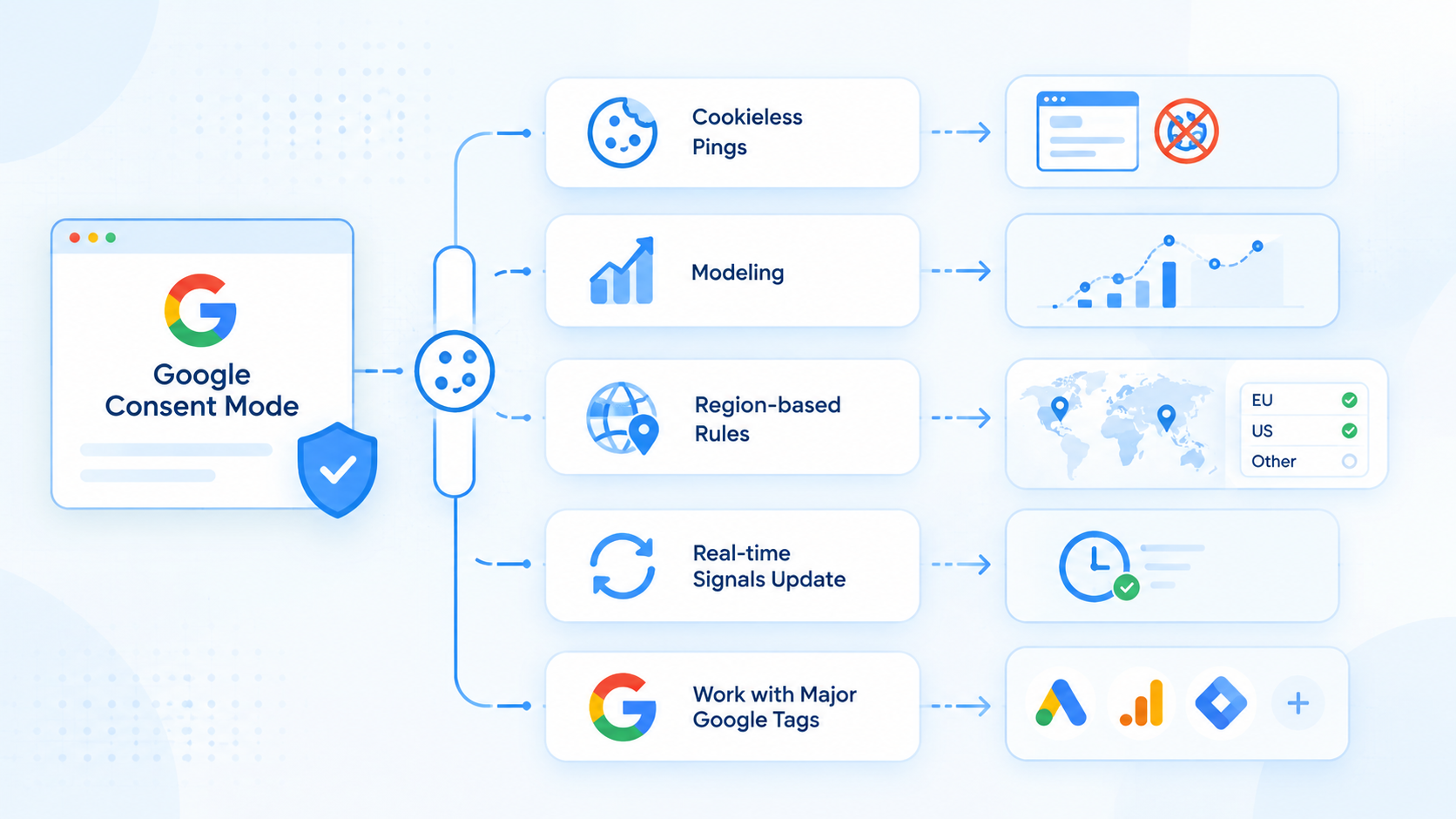
Google Consent Mode has several neat features that may be useful for both compliance teams and marketing teams. It has more options than simply turning tracking on or off and has a more flexible approach to collecting data.
| Features | Why it matters |
|---|---|
| Cookieless pings | Sends basic, non-identifying data even when consent is declined |
| Modeling | Uses statistical models to estimate conversions when consent data is missing |
| Region-based rules | Applies different consent defaults based on visitor location |
| Real-time signals update | Adjust tag behaviour instantly when a visitor change their choice |
| Work with major Google tags | Support Google Ads, Google Analytics, Floodlight and more |
Its modeling function is particularly impressive as it allows marketers to benefit from increased volumes of data, even when many users choose to opt-out of allowing their data to be used. Google can analyze this information using statistical models and provide estimates to the business.
What Are the Benefits of Using a CMP With Google Consent Mode?
The use of a CMP in combination with Google Consent Mode offers a number of significant benefits:
- Improved compliance by preventing trackers to load before obtaining consent and ensuring that Google’s own tracking tags are also consent dependent, a CMP + Google Consent Mode helps to reduce potential GDPR, CCPA, DPDPA, etc. violations.
- Better marketing data rather than having to discard all analytics and marketing data when users decline consent, marketers can take advantage of the limited, anonymous signals collected by Google Consent Mode.
- Trust users are more likely to accept a cookie policy presented in a neutral, straightforward manner; a CMP enables you to avoid the use of “dark patterns” by providing equal emphasis to “accept” and “reject” options (as seen in this example from ConsentX).
- Development efficiency using a CMP, you avoid writing custom consent logic for all of your tracking tags – this can save a significant amount of engineering time.
- Easy auditing a good CMP will keep a record of all consents, timestamps and relevant policies for easy regulatory review and audit.
What Are the Different Implementation Modes?
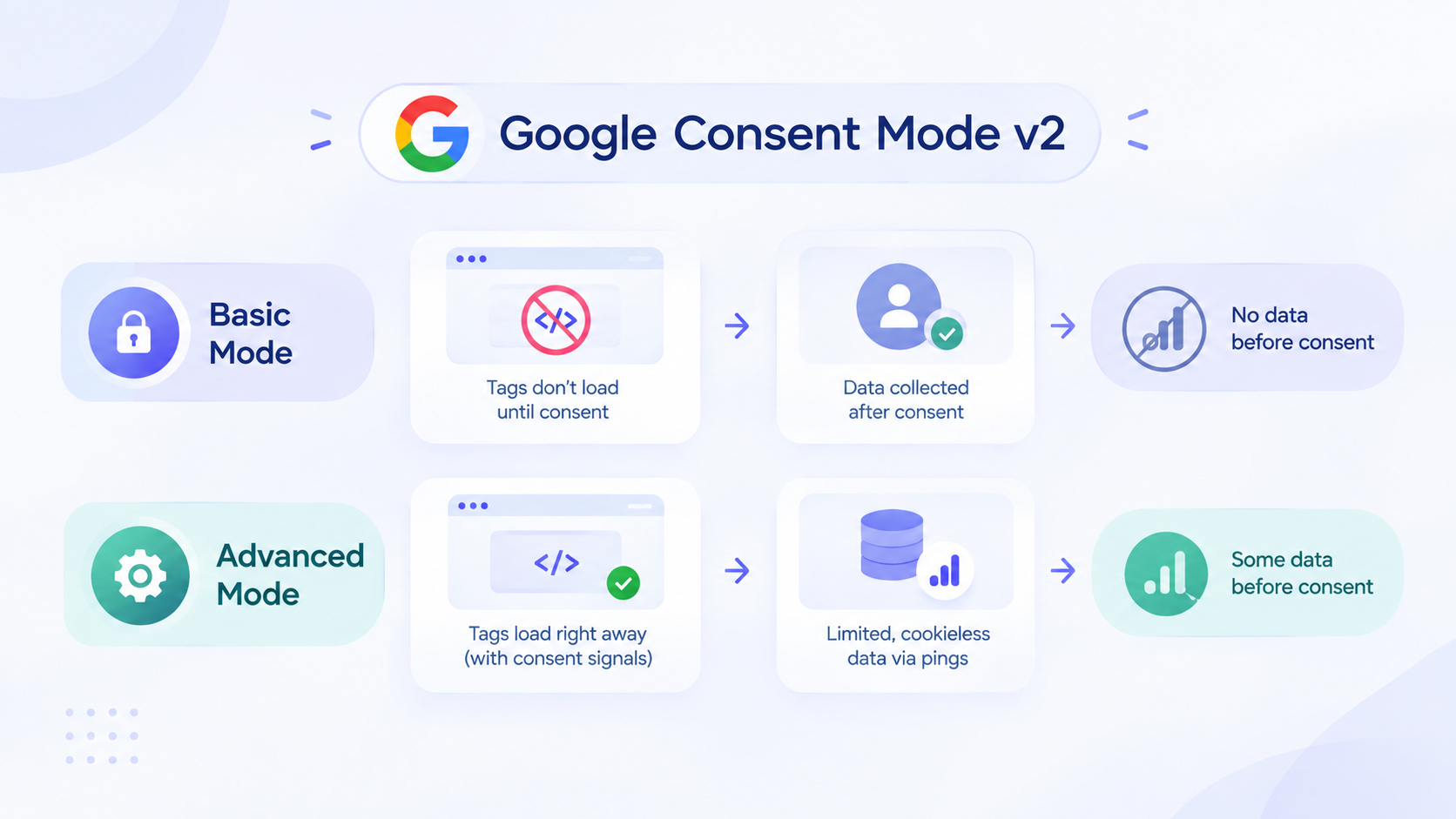
Google Consent Mode v2 has two options for setting up tracking – basic and advanced. The key difference is the amount of information collected about the user’s activity on the site.
| Implementation Mode | How it works | Data Collected before consent |
|---|---|---|
| Basic Mode | Tags do not load at all until Consent is given | None |
| Advanced Mode | Tags load right away but adjust behaviour based on Consent signals. | Limited, Cookieless data through pings. |
With the basic setup, everything is much simpler – no scripts are triggered until the user interacts. The downside is that no data is collected about users who rejected cookies or have not yet interacted with the banner
Advanced settings allow you to collect much more information and better control what users who have not consented to tracking can see on your website. Using this option requires more careful adjustments so that no tracking technologies collect any personal information about non-consenting users. All tags are still fired, but adapt their behavior depending on the signals sent by the CMP cookie. If, for example, a user has declined tracking, they will receive anonymous, cookieless pings to Google, which will allow the company to collect some information about such users through its systems.
How Do You Choose the Right Implementation Mode for Your Website?
The appropriate mode depends on the characteristics of your website, the resources at your disposal, and how much insight into data collection your team needs.
If you have a less complex website or are new to consent management, the Basic mode is easier to implement and reduces the margin of error, as it does not involve any data collection until a user consents.
If you have an extensive website with active advertising campaigns, the Advanced mode is worth the investment. The collection of cookieless pings and the use of predictive modeling tools allow you to maintain a general understanding of your campaign performance, which is critical for CPM-based advertising and revenue. As more users choose to opt out of data collection, these insights become even more important for e-commerce websites, media publishers, and other industries that use Google Ads campaigns as their primary source of revenue.
Depending on the legal jurisdiction, you may also have to adjust your default mode to comply with local regulations. In particular, some regions have strict privacy laws that require advertisers to disable all tracking functions by default and only enable them once the user provides explicit consent. By using a CMP provider that has a region-specific rule engine built-in, such as ConsentX, you can program your cookies to fire in specific regions without having to adjust the code for each region manually.
Know More: What Consent Mode V2 Means for your Website
How Do You Integrate a CMP With Google Consent Mode?
The standard setup of the connection between a CMP and Google Consent Mode is similar for all CMPs. The process itself is relatively straightforward: you only need to add a tag to your website’s code (or upload the CMP script to the Tag Manager if you have it) and customize the CMP’s appearance and settings. You will also need to launch the CMP in the Google Consent Mode and spend some time testing the setup before launching your website.
- You need to install the CMP of your choice. Typically, you can either add the script directly to your website’s code (preferably in the header) or use the Tag Manager. Some CMPs, including ConsentX, have WordPress plugins, so that you do not have to edit your website’s code. Next, you need to adjust the settings and appearance of your CMP. You will need to pick a layout and write descriptions for each cookie category. It is also important to ensure that the “accept” and “reject” buttons are clearly visible and equal in size, as regulators are especially wary of the possibility of persuasion.
- Then you need to connect the CMP to the Google Consent Mode and launch a test. In most cases, this step requires no action on your part, as CMPs only notify Google about users’ decisions once Google Consent Mode is activated. Ad_storage, analytics_storage, ad_user_data, and ad_personalization will automatically update depending on the visitors’ choices. If you use the Google Tag Manager, you will also have to set default consent settings in your settings module.
Make sure to test your tag manager before launching your website. It is a good idea to open your website in a new tab to ensure that no first-party cookies are active by default and that tags do not fire before consent is given. You should also check that your CMP processes visitors’ consents without any issues. This step is crucial if you want to avoid problems with your website’s launch.
How Can You Check if Google Consent Mode Is Enabled?
Once your CMP is connected, it is a good idea to make sure Google Consent Mode is actually working. Here are a few simple ways to check that.
The easiest way to check is using the tag assistant tool provided by Google. It allows you to preview the tags on your site and see what consent state you are currently in. You can see how the signal from ad_storage/analytics_storage switches as you accept or decline cookies on your CMP.
You can also open up your browser's dev tools and check the network requests. Look for any requests being made to Google's servers and check their parameters. If everything is set up correctly, you should see that any request made has the ad_storage/analytics_storage parameter included, even if you declined tracking via your CMP.
A simple way to test it yourself is to clear all your cookies, reload the page you are testing in an incognito window, and try declining all non-essential cookies. Then check your dev tools' console/network panel to see if any advertising or analytics cookies are being set.
Conclusion
The Consent Mode built into Google's platform allows website owners to collect the data they need useful respecting the visitors' choices. However, its effectiveness depends on the proper cooperation with another tool: CMP. As explained in the brief, CMPs are the platforms which allow websites to collect user data by asking them for consent and passing it to Google's tags to adjust their behavior in accordance with the given permission.
With ConsentX, you can easily manage user consent and keep Google tags aligned with consent preferences.