

Introduction
Every time a user visits a website, several small files get stored in his/her device. These files are commonly referred to as cookies. Although this phenomenon may seem unimportant to some people, cookies actually influence almost every aspect of a user’s activity on the website. It is necessary to explain that cookies determine what information a website may save about a user, what they want to tell the user, and what behaviors are beneficial for the user to engage in.
Therefore, the concept of cookie blocking was created. Cookie blocking is a process of preventing a website from saving or accessing cookies on the user’s device. Such a process can be applied manually or automatically using a web extension. Additionally, websites can also refuse to provide cookies until the user specifically asks for them. Various cookie-blocking techniques create specific conditions for users visiting the websites.
Website owners usually apply cookie-blocking methods to fulfill legal demands, for example, the General Data Protection Regulation (GDPR) and the California Consumer Privacy Act (CCPA). These demands require websites to inform a user about the collection of his/her data and obtain consent from them. Failure to comply with cookie laws can result in serious penalties and damage a company’s reputation. On the other hand, the same cookie laws require websites to ask for consent to store cookies on users’ devices. This indicates that a user has a legitimate right to deny this request. From the user’s perspective, cookie blocking helps to maintain their privacy and prevent tracking of their browsing history and behavior.
It is evident that the topic of cookie blocking is highly relevant and critically important for websites, marketers, and customers. Major browsers such as Safari and Firefox have started to block third-party cookies by default. Moreover, legal requirements and users’ privacy concerns keep changing. Therefore, a company, a marketer, or an average user must be aware of these changes and provide the necessary adjustments to their websites or browsers.
How Website use Cookies
A cookie can be described as a small piece of data in the form of a text file stored on a user’s web browser by a website server. It is worth noting that the file, which contains some encrypted information, is read by the server every time the page is reloaded or revisited. Therefore, cookies enable sites to recognize a particular user.
To understand how the online tools work, one should compare them to a coat-check ticket. In this analogy, a person’s garment is data stored on the server, while the paper ticket represents a cookie, and the coat-check attendant stands for a web server. When a person visits a website, the latter stores some data about him/her on its server. Every time the person comes to the site, the web server recognizes him/her and offers the same experience.
Among the common uses of cookies are the following:
- The sites enable users to remain online without reloading the page or providing their passwords.
- The platforms remember the items added to the user’s cart
- The systems recall the user’s preferences, including the language and appearance of the site.
- The servers count the number of visitors and recognize the most popular pages.
- The sites keep track of users’ interests in order to provide them with relevant advertisements.
Most of the common uses of cookies are beneficial for both parties. However, it should be noted that the tracking systems may feel invasive. Therefore, the issue of privacy is of great importance to the general public.
Why do you need Cookie blocking?
The main benefit of cookie blocking is that it allows users to manage which data is collected and which is not. There are several reasons why both sides – the website owners and the visitors, benefit from using a blocking tool.
The reasons for implementing cookie blocking on the website include:
- The legal aspect The website owners should be aware of the legal requirements and laws related to the topic. For example, GDPR, ePrivacy, and CCPA require user consent before placing or refetching any cookies. Using cookie blocking tools helps the owners comply with the regulations. Moreover, such tools help avoid substantial sanctions that can arise from violating privacy laws.
- Increased trust and visitors The described above tool allows the website visitors to be in control of their data. Users will appreciate the opportunity to manage what information is collected and what is not. This will lead to gaining trust and increasing visitors.
The two reasons for cookie blocking, from the user’s perspective, are:
- Enhanced privacy features Cookie blocking tools help users keep their data private. They also prevent the collection of personal data by websites. It will reduce the amount of shared information with third parties.
- Reduce the risk The described tools are also useful because they help users reduce the risk of being tracked and targeted online.
Overall, the cookie blocking tools are very important. Their primary function is to return control to the users. The collected data is managed by the users; thus, they decide who will have access to it and who will not.
Know More : Essential Vs Non Essential Cookies : What Businesses Need to know
What Is Cookie auto blocking?
Manual work does not scale. A busy website might involve dozens of scripts. Each can potentially place its own cookies on the user's computer. Such a tedious task can hardly be performed manually without errors.
This is why some websites utilize cookie auto-blocking. It is a convenient tool which scans the website, gathers the list of cookies and scripts and blocks them until the user consents to their use. It requires no coding and can be easily updated for new additions to the website.
Here is how the cookie auto-blocking generally works:
- It scans the website and compiles the list of cookies and scripts.
- Then, it sorts them into cookie categories which will be specified below.
- Subsequently, it blocks all the cookies which do not have a consent checkbox.
- When the user clicks accept, all the blocked cookies are enabled.
- Finally, the user's choice is remembered so that they do not need to reconfigure their preferences on every single website.
Cookie auto-blocking not only helps to save time and prevent mistakes but also scales with your website. If you add a new feature, such as a chat, an additional script will be required, which will be automatically blocked by the cookie auto-blocking tool. You can also utilize a consent management platform like, for example, ConsentX to manage your cookie consents in an automated way.
First Party vs Third Party Cookie
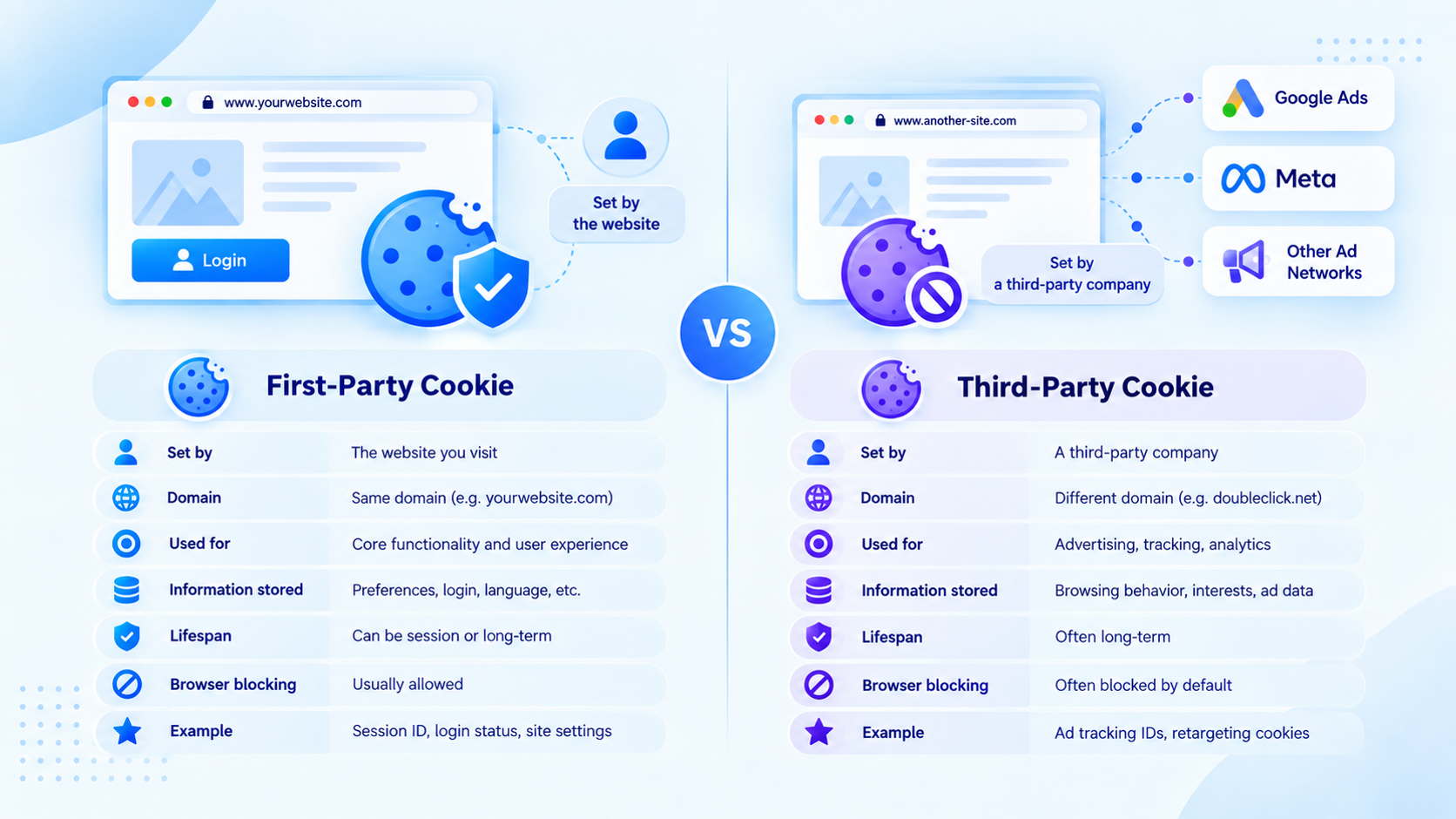
To understand cookie blocking, one has to know who owns the cookie whether the first or third party.
First-party cookies originate from the visited domain; their main purpose is to provide information about the surfing session on that domain.
| Feature | First-Party Cookies | Third-Party Cookies |
|---|---|---|
| Who set them | The site you visit | An outside company |
| Main purpose | Login, cart, settings | Ad tracking, profiling |
| Where they work | Only on that one site | Across many Sites |
| Privacy risk | Low | High |
| Browser Blocking | Rarely blocked | Often blocked by default |
| Example | Keeping you signed in | Following you to show ads |
Meanwhile, third-party cookies belong to a different company (ad network) whose code is embedded within the targeted domain.
It is worth noting that browsers prioritize third-party cookies, and both Safari and Firefox have default settings to block them, while Chrome has also joined the trend and advanced privacy protection. The reasoning behind the move is clear; third-party cookies are often used to stalk users and follow them from site to site – without their knowledge. However, it should also be mentioned that first-party cookies should also be blocked if they serve tracking and advertisement purposes.
Therefore, smart cookie-blocking software analyzes the cookie’s origin and purpose and not necessarily the first party
Types Of Cookies
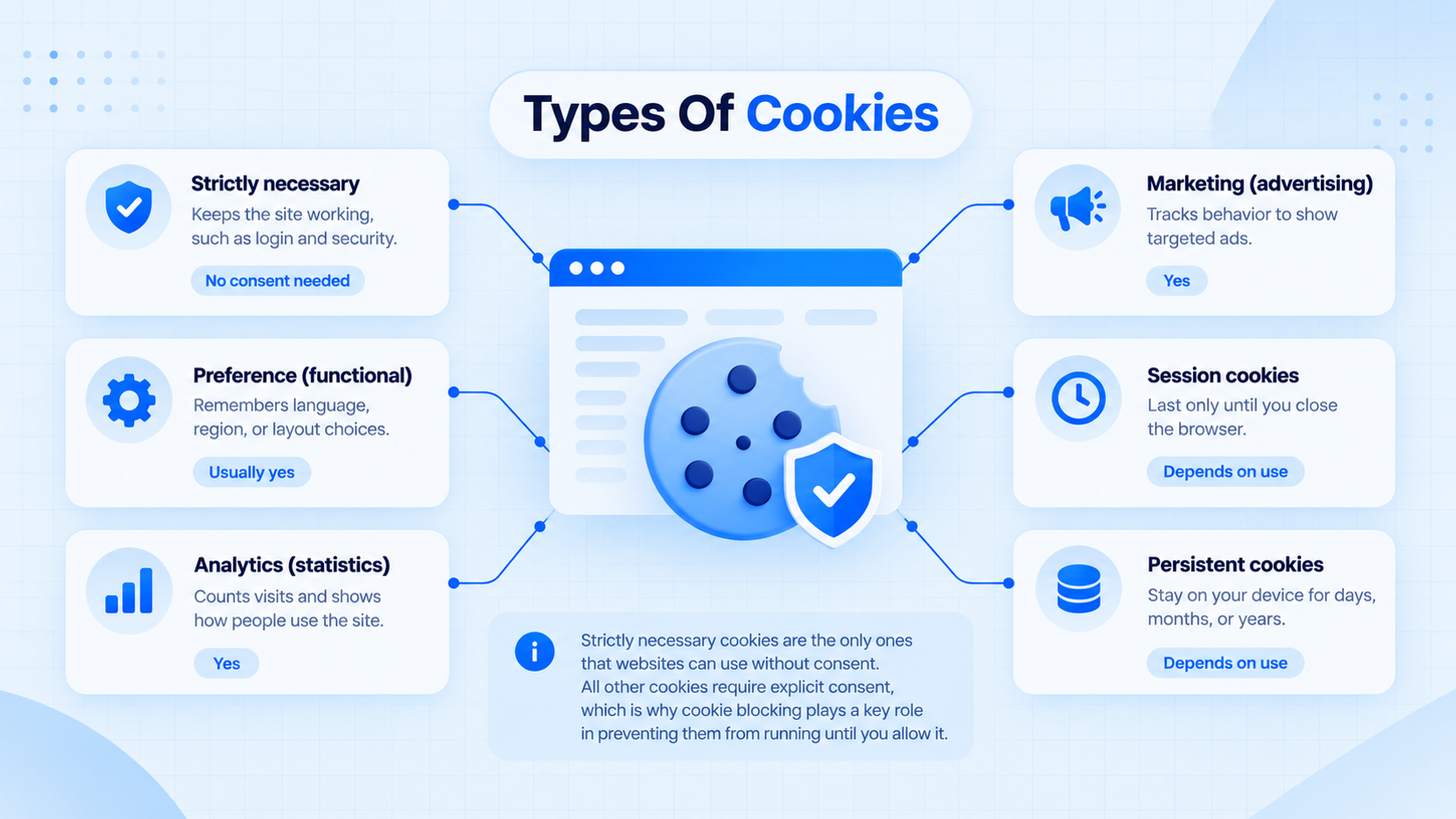
Cookies can also be classified according to their purpose. With that classification in mind, it becomes apparent why certain cookies should be allowed, and which ought to be blocked.
| Cookie Type | What It Does | Need Consent? |
|---|---|---|
| Strictly necessary | Keeps the site working, such as login and security | No |
| Preference (functional) | Remembers language, region, or layout choices | Usually yes |
| Analytics (statistics) | Counts visits and shows how people use the site | Yes |
| Marketing (advertising) | Tracks behavior to show targeted ads | Yes |
| Session cookies | Last only until you close the browser | Depends on use |
| Persistent cookies | Stay on your device for days, months, or years | Depends on use |
Strictly necessary cookies are the only ones that websites can set without consent. These are cookies that are essential for the operation of a website, such as a shopping cart or an authentication session.
All the other cookies require explicit consent from the user, which is why cookie blocking plays its primary role in relation to them. By blocking them, the script will not be able to run until the user grants permission, which is a suitable default for analytical and marketing cookies through a Cookie Consent Banner
Impact of Cookie Blocking on Websites, Marketers & Users
The cookie blocking feature impacts the web ecosystem differently for various stakeholders. The positive and negative implications of this tool have to be estimated in detail.
| Group | Positive Impact | Challenges |
|---|---|---|
| Websites | Better legal safety, stronger trust, cleaner data practices | Less visitor data, extra setup, need for a consent tool |
| Marketers | Focus on real, permission-based audiences and first-party data | Weaker ad targeting, harder tracking, gaps in reports |
| Users | More privacy, more control, fewer creepy ads | Some features may break, more pop-ups to answer |
Website owners. The cookie-blocking possibility allows representing the website visitors with an improved emphasis on privacy. This approach will generate higher engagement and loyalty to the brand. The loss of analytics is the only apparent negative consequence. Marketers lose some metrics concerning the performance of their promotion campaigns.
Marketers. This stakeholder group suffers from the cookie blocking due to the decreased potential to place targeted advertisements. The utilization of third-party data for building customer segments is complicated when cookie-blocking features are enabled. Nevertheless, first-party data, permission-based marketing emails, and alternative content offer a solid opportunity to build a successful marketing strategy. In this case, the audience is engaged in a more meaningful way compared to the traditional approach.
Website users. This group benefits from being in control of personal data and deciding which websites can utilize this information. In addition, users can customize their experience by selecting essential cookies and rejecting unnecessary ones. The only possible downside is a slightly more complicated process of adding items to the basket or identifying the user on a specific website.
In general, the described outcomes reflect the overall positive impact of the discussed feature on the web ecosystem. In particular, the cookie-blocking possibility supports fair competition among website owners and promotes the creation of a sustainable business model based on trust.
Why Do Browsers Block Cookies? (Privacy & Regulations)
Browsers are not blocking cookies for fun. There are two main reasons for this – user privacy and legislation.
User privacy. People have gotten tired of being tracked. Research, conducted both in scientific studies and in the press, has exposed the scale of advertising surveillance. Browsermakers have responded by developing alternative measures to protect user privacy. Safari has introduced Intelligent Tracking Prevention, and Firefox has developed Enhanced Tracking Protection. Both browsers have built cookie-blocking technology directly into their software, thus prohibiting cross-site tracking by default. Chrome has also introduced privacy-focused features and given users more control over cookies from third parties.
Legislation and regulations. Many governments have introduced privacy laws that require obtaining explicit consent from users before storing non-essential cookies on their devices.
Some examples of legislation that may affect your business are:
- GDPR (General Data Protection Regulation) Europe’s data protection regulation that requires companies to receive consent from users before storing non-essential cookies.
- ePrivacy Directive directive on privacy and electronic communications that also affects the use of cookies.
- CCPA/CPRA (California Privacy Rights Initiative) California’s privacy law, which, among other things, allows users to prohibit the collection and sharing of their data.
- Other regulations and laws similar to the GDPR are being adopted in many countries: for example, in Brazil, India, and Canada.
These regulations require companies to inform users of the collection of their data, which cookies do, and give them a choice about allowing or rejecting them. At the same time, browsers are taking steps to help users manage and block cookies on their own. Such measures by browsers indirectly encourage the adoption of privacy-friendly technologies on websites because they increase protection against tracking.
Therefore, for the security of your website visitors and to maintain compliance with privacy laws, you should not rely only on browsers and tracking protection technologies. It is best to use your own cookie consent management solution that will block cookies until the user consents to their storage on their device.
Conclusion
Cookies make the Internet better, but they have the potential to invade privacy in ways that most people never consent to. Cookie blocking is a solution that prevents non-essential cookies from loading before permission is given by the visitor. In this article, I have discussed the phenomenon of cookie blocking in detail.
We have examined how cookies are used on websites, from authentication and shopping baskets to analytics and advertising. We have also considered the importance of cookie blocking for legal compliance and reputation. Moreover, we looked at the concept of cookie auto-blocking, which is a convenient solution that takes care of the details for you. During our discussion, we have identified the difference between first- and third-party cookies and examined the functions of various types of cookies. Finally, we have assessed the impact of cookie blocking on websites, marketers, and users.
With growing privacy concerns, the Internet environment is shifting toward greater transparency and control. Browser producers are making tracking cookies harder and harder to use, and legal regulations are becoming stricter worldwide. The companies that understand the importance of adapting to the new circumstances will be the winners in this industry. If you are responsible for a website that uses cookies, it is high time to consider implementing a cookie-blocking feature.
Want to manage cookies and user consent more easily? Explore ConsentX and simplify cookie compliance for your website.